Agentic AI: How Autonomous LLM Systems Actually Work
Most production Large Language Model (LLM) implementations today operate as sophisticated, stateless text predictors. You send an input prompt, the model calculates probabilities across its vocabulary, generates an autoregressive completion, and terminates the connection. Even Retrieval-Augmented Generation (RAG) maintains this strict single-turn paradigm: an external vector store intercepts the query, retrieves matching document chunks, injects them into the context window, and requests a one-shot synthesis.
This request-response architecture works reliably for summarization, entity extraction, and customer support Q&A. However, it fails catastrophically when applied to non-linear engineering tasks. A single-shot LLM cannot investigate a production incident, refactor an untested codebase across multiple files, or diagnose a failing CI/CD pipeline. These workflows require iterative branching, environmental feedback, tool execution, and the ability to detect and recover from runtime errors.
This operational gap is where Agentic AI enters the architectural landscape. Stripped of venture capital marketing buzzwords, an AI agent is not a new neural network architecture. It is a stateful software runtime that wraps an LLM inside an autonomous control loop, giving the model memory, tool execution privileges, and decision-making authority to interact with external environments until a defined objective is achieved.
Looking for a quick terminology reference? Check out our companion engineering guide: Agentic AI Terms Explained: An Engineer's Practical Glossary, translating agent concepts into backend software analogies.
Building the Right Mental Model: Before the Architecture
Before diving into formal control-loop mathematics and multi-agent topologies, it is worth anchoring the discussion with the correct intuition. Many engineers initially describe Agentic AI as "software that takes AI help to make decisions" — which is directionally correct but subtly backwards. Getting this inversion right is the most important conceptual unlock.
The Core Loop: Observe → Reason → Act → Repeat
At its most fundamental level, an AI agent operates as a reactive loop where the LLM is the "brain" and software code is the "hands." The model is given a goal, decides the next step, the code executes it, and the result is fed back so the model can decide what to do next — repeating until the goal is satisfied.
flowchart TD
    G([Goal / Context]) --> OBS

    OBS["Observe
Augment context with
tool schemas & prior observations"] --> LLM

    LLM{"Reason
LLM - Policy Engine"} -->|"Action intent (JSON tool call)"| CODE
    LLM -->|Goal satisfied| DONE([Final Answer])

    CODE["Act
App Code - parse, validate,
auth & sandboxing"] --> ENV

    ENV["External Environment
API / DB / Code Sandbox"] -->|"Raw result (data / error)"| OBS_OUT

    OBS_OUT["Tool Observation
Injected back into context
as role: tool message"] --> OBS
The 4 Pillars of Agentic AI Architecture
Frameworks like LangChain, AutoGen, and LlamaIndex turn a raw LLM into an autonomous agent by wrapping it in four interdependent subsystems. Each pillar maps directly to a well-established concept in AI research — understanding those connections gives you far sharper intuition for why the architecture is wired the way it is.
flowchart TD
    MEM["① Memory Sub-System
Short-term: Context Window
Long-term: Vector DB / SQL Store"] --> REASON

    INPUT(["Input
Goal / Context or External Event"]) --> REASON

    REASON["② Planning & Reasoning Engine
LLM - Policy & Decision Core"] --> ACTION

    ACTION["③ Tool & Action Integration
Executes APIs, DBs, Code Sandboxes"] -->|"④ Observation / Outcome
fed back as role: tool message"| REASON
| Pillar | Standard Term | Role & Key Nuances |
|---|---|---|
| 1. Memory | Memory Module |
Maintains state across the control loop, split across two distinct tiers:
Short-term (Peripheral): The LLM's active context window — holds the system prompt, current goal, conversation history, and all intermediate Thought-Action-Observation turns from the ongoing session. Extremely fast but finite; performance degrades as it fills. Long-term (Persistent): External stores that survive session boundaries — vector databases for semantic retrieval, SQL tables for structured entity lookups, or key-value caches for user preferences. Retrieved on demand via dedicated tool calls. |
| 2. LLM as Decision Core | Planning & Reasoning Engine | The cognitive center of the agent. Given the current memory state and incoming context, the model decomposes high-level user objectives into discrete sub-goals, determines the next action to take, and selects which tool (if any) to invoke. It does not execute anything itself — it only produces structured intent that the host runtime acts upon. |
| 3. Tool Calling | Action / Tool Integration Layer | The execution boundary where intent becomes effect. The LLM emits a structured JSON payload (a tool call) and halts generation. The host application framework intercepts this payload, validates parameters, enforces authentication and sandboxing, then dispatches the actual network request, database query, or script execution. The LLM never touches external systems directly — it only decides what to call and with what arguments. |
| 4. Feedback Loop | Reflection, Observation & Event Loop |
The mechanism that closes the control loop. After a tool executes, its result is injected back into the
context window as an Observation (a role: "tool" message). The LLM reads this
outcome alongside the original goal, reflects on whether the objective has been satisfied, self-corrects if the
result was unexpected, and decides whether to take another action or terminate. Without this loop, the agent
cannot course-correct — it would be a single-shot pipeline, not an autonomous system.
|
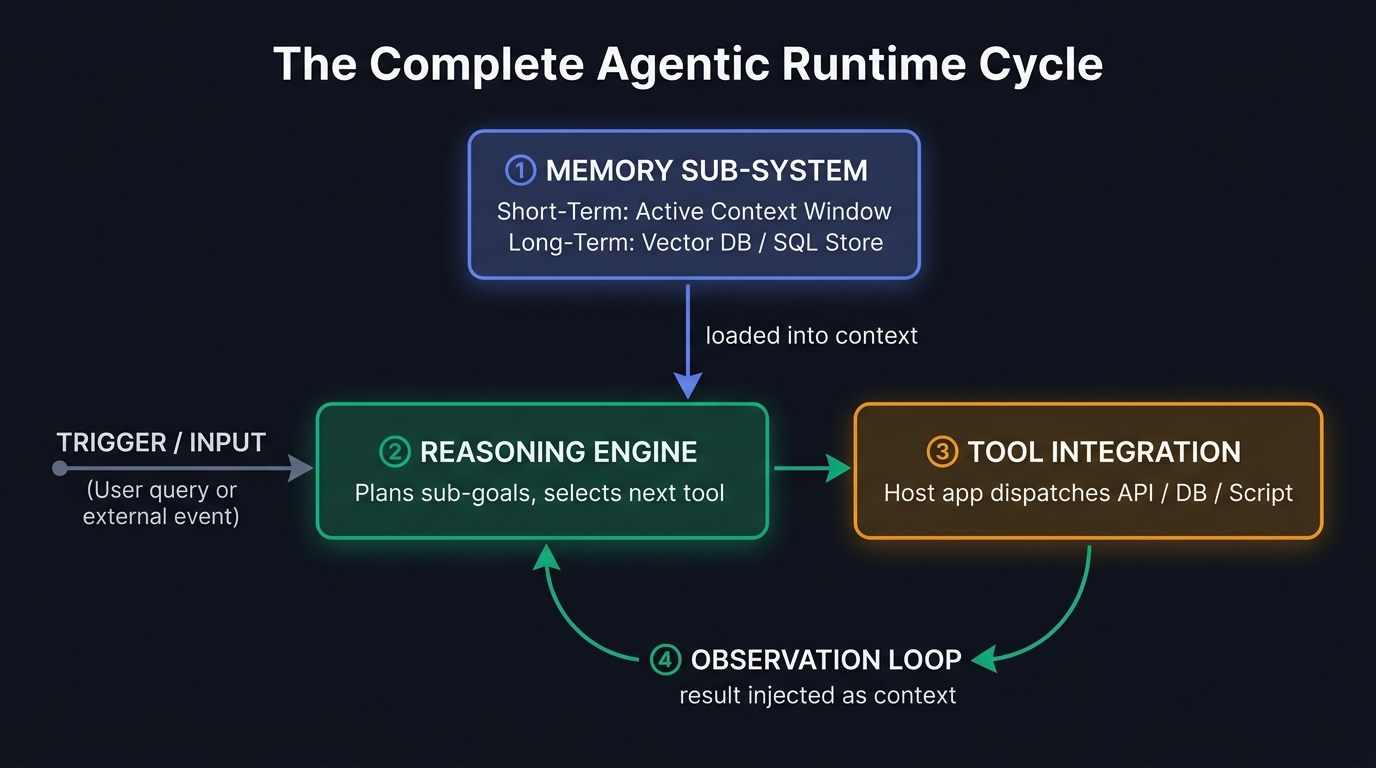
The Complete Agentic Runtime Cycle
Connecting all four pillars into a continuous execution cycle produces the following runtime topology. Notice how every component feeds into the next — there is no fixed sequencing script. The LLM engine decides the path at every step based on what it observes.
Synchronous Loops vs. Event-Driven Agents
The fourth pillar is worth a closer look, because it covers two meaningfully different operational modes depending on how the input trigger arrives.
In the synchronous (request-response) model — the most common pattern in chatbots and copilots — the loop runs in a direct call-and-response cycle. A user submits input, the LLM reasons and calls a tool, the observation is injected, and the LLM either calls another tool or produces a final answer. The loop runs until the goal is satisfied, then stops waiting for the next user message.
In the event-driven (asynchronous) model — the architecture used by fully autonomous agents — the agent does not wait for a human prompt to begin a new iteration. Instead, external software signals act as triggers: a webhook from a monitoring system, a scheduled cron job, a database write event, or a message arriving on a queue. That event is routed directly into the LLM engine as the new context input (pillar 2), which then proceeds through tool execution (pillar 3) and observation feedback (pillar 4) without any human in the loop.
Why this matters architecturally: In synchronous agents, the user is effectively the event source — human patience limits the loop duration. In event-driven agents, the runtime itself controls the cadence, which means guardrails and halting criteria (covered in the Five Subsystems section below) become critical safety mechanisms rather than optional polish.
Watching the Loop Run: A Real Example
Theory is one thing. Let's watch the loop actually run.
Say your agent gets this task: "Find the average price of laptops in our stock database and email me the summary." You can't answer that in a single prompt. There's no way for the model to know the prices without querying the database, and it can't send an email without knowing the answer first. So it works through it one step at a time.
Step 1 — The agent goes to get the data
Before the model can write any query, it needs to know what it's querying. This is where the tool registration matters. When the developer sets up the database tool, they don't just give the agent a connection string — they describe the schema too. The system prompt might include something like:
Tool: query_database
Description: Run a read-only SQL query against the stock database.
Schema:
  products(id, name, category, price, stock_qty, last_updated)
That schema lives in the model's context window before the conversation even starts. So when the user says
"find the average price of laptops," the model already knows there's a products table,
that category is the right column to filter on, and that price is the number it needs.
It's not guessing — it's reading the spec it was given.
With that context, the first action is straightforward:
SELECT price FROM products WHERE category = 'laptop'
The database comes back with [800, 1200, 1000]. That result gets injected back into the model's
context window as an observation — it's now part of the conversation the model is reading.
Step 2 — Now it does the maths
With the prices in hand, the agent moves to the next logical step: compute the average. It calls a calculation tool,
gets back $1000, and that becomes the next observation fed into its context.
Step 3 — And finally, sends the email
The model now has the answer: $1000. The last tool it has available is send_email — which wasn't
built by the LLM, it was registered by the developer, just like the database tool. The tool definition in the system
prompt looks something like:
Tool: send_email
Description: Send an email to the currently logged-in user.
Parameters:
  - body (string): The message content to send.
Note: The recipient address is always the authenticated user.
      Do not ask the model to supply it.
Notice the developer already locked in the recipient. The model doesn't need to know or guess the user's email address — the application handles that internally when it actually executes the tool. The model just supplies the body.
So the model emits a tool call:
send_email(body="Average laptop price in stock: $1000")
The app framework receives that JSON, maps it to the real send_email function it registered, pulls the
authenticated user's address from the session, and fires off the actual SMTP request. The LLM never touched an
email server — it only decided what to say. The code decided how to send it.
Done. The loop stops because the goal is satisfied.
flowchart TD
    START(["Goal: avg laptop price
& email the summary"]) --> S1

    S1["Step 1 — Query DB
Schema from system prompt
SELECT price FROM products
WHERE category = 'laptop'"] --> OBS1

    OBS1(["Observation: [800, 1200, 1000]"]) --> S2

    S2["Step 2 — Calculate average
calculate_mean([800, 1200, 1000])"] --> OBS2

    OBS2(["Observation: $1000"]) --> S3

    S3["Step 3 — Send email
Developer-defined tool
send_email(body=...)
App resolves recipient"] --> DONE

    DONE(["Goal satisfied
Loop stops"])
The ReAct Loop — How an Agent Actually Thinks
Most agents are built around a pattern called ReAct (short for Reason + Act). It sounds fancy but the idea is pretty straightforward.
The problem ReAct solves: pure reasoning and pure action both fail on their own.
- If the model only reasons, it spins up a great internal monologue but can't actually touch anything — no live data, no APIs, no filesystem.
- If the model only acts, it fires off tool calls immediately without checking whether it has the right inputs, and promptly goes off the rails.
ReAct solves this by making the model alternate between thinking and doing — always in that order:
- Thought: The model asks itself what it knows so far and what it needs to figure out next. This happens entirely inside the context window — the model isn't calling anything yet.
- Action: The model picks a tool and emits a structured call. Generation stops. The ball is now in the application's court.
- Observation: The app runs the tool, gets a result, and injects it back into the conversation as a new message. The model reads it like a reply in a chat thread.
- Reflection: Did that get us closer to the goal? If yes, move on. If not, rethink and try something else. If done, stop.
Here's that loop running against a real scenario — a production memory spike in the Billing Service:
sequenceDiagram
    autonumber
    participant U as User / Client
    participant A as Agent Controller (LLM)
    participant W as Working Memory (Scratchpad)
    participant T as Tool Runtime (Sandbox)
    participant E as Infrastructure APIs

    U->>A: Submit Goal ("Diagnose memory spike in Billing Service")
    activate A
    A->>W: Initialize Context (Objective + Registered Tool Schemas)
    deactivate A

    Note over A, E: ── ITERATION 1: INSPECT TELEMETRY METRICS ──
    activate A
    Note over A: Step 1: Reason (Thought)
"Need container memory usage over the past 60 minutes"
    A->>W: Append Reasoning Trace to Scratchpad
    A->>T: Action: query_prometheus({metric: "container_memory_working_set_bytes", app: "billing"})
    deactivate A
    activate T
    T->>E: HTTP GET /api/v1/query_range
    E-->>T: 200 OK: [{timestamp: 171800, bytes: 4294967296}]
    T-->>W: Inject Observation: "Memory spiked from 512MB to 4.2GB at 14:15 UTC"
    deactivate T

    Note over A, E: ── ITERATION 2: CORRELATE WITH RECENT RELEASES ──
    activate A
    W->>A: Load Current State (Goal + History + Observation 1)
    Note over A: Step 2: Reason (Thought)
"Spike coincides with 14:15 UTC. Inspect deployment commits"
    A->>W: Append Reasoning Trace to Scratchpad
    A->>T: Action: fetch_git_diff({repo: "billing-service", since: "14:00 UTC"})
    deactivate A
    activate T
    T->>E: Git CLI / GitHub REST API
    E-->>T: Commit diff: "PR #882: Unbounded cache added to tax calculation loop"
    T-->>W: Inject Observation: "Commit 8e3a21 added global unevicted HashMap"
    deactivate T

    Note over A, E: ── TERMINATION: SYNTHESIZE ROOT CAUSE & HALT ──
    activate A
    W->>A: Load Complete State (Goal + History + Observations 1 & 2)
    Note over A: Step 3: Reason (Thought)
"Root cause confirmed: Unbounded cache leak in Commit 8e3a21"
    A->>U: Final Answer: Root cause report + proposed patch PR
    deactivate A
Two tool calls, two observations, and the agent has a root cause. No human had to guide it between steps — it figured out the sequence itself based on what came back each time. That's what makes it agentic rather than just a fancy autocomplete.
The Five Subsystems Behind Production AI Agents
Building a reliable autonomous agent requires treating the LLM as merely one component of a larger distributed system. Enterprise-grade agent runtimes are composed of five decoupled subsystems:
Core Architectural Rule: Never allow an LLM to execute code directly within its hosting process. Always decouple the Reasoning Engine from the Tool Runtime using isolated network boundaries, ephemeral Docker containers, or microVM sandboxes (e.g., Firecracker or gVisor).
1. The Reasoning Controller (System 2 Engine)
The foundation of the agent is an autoregressive transformer fine-tuned specifically for tool calling, JSON schema compliance, and multi-step deduction (e.g., Claude 3.5 Sonnet, GPT-4o, or DeepSeek-V3). Unlike conversational bots, the controller model must excel at negative constraint adherence—meaning it must resist calling tools when insufficient parameters exist and consistently detect when it has entered an unrecoverable failure loop.
2. Working Memory & Ephemeral Scratchpad
Working memory is the active context window containing the system prompt, tool definitions, conversation history, and intermediate Thought-Action-Observation turns. Because modern LLMs suffer from performance degradation as context length increases (known as the "Lost in the Middle" phenomenon), production architectures aggressively prune, summarize, or offload older observation records to preserve reasoning quality.
3. Tool Registry & Execution Sandboxes
The Tool Registry exposes typed interfaces to the model via JSON Schema declarations. The host runtime enforces parameter validation, authentication, rate limiting, and execution sandboxing. If an action invokes an arbitrary Python interpreter or SQL engine, execution must occur in a restricted, read-only or ephemeral environment to prevent malicious host compromise.
4. Planning & Task Decomposition Engine
Complex objectives easily overwhelm single-pass agent loops. The planning subsystem breaks macro goals into discrete Directed Acyclic Graphs (DAGs). Rather than executing blindly, the agent can use algorithms like Plan-and-Solve (generating an explicit plan upfront and executing nodes sequentially) or Tree of Thoughts (ToT) (exploring multiple alternative decision branches and pruning non-viable paths).
5. Guardrails & Halting Criteria
Autonomous loops without termination criteria are a recipe for infinite recursion, rate-limit exhaustion, and
astronomical API bills. Halting subsystems evaluate hard deterministic bounds (e.g., maximum steps
N ≤ 12, maximum
wall-clock time t ≤ 120s, or cumulative token expenditure ≤ 50,000 tokens) alongside semantic
circuit
breakers that detect repeating action loops.
| Subsystem | Primary Responsibility | Software Equivalent | Primary Failure Mode |
|---|---|---|---|
| Reasoning Controller | Policy evaluation, task planning, tool selection | CPU / Scheduler | Reasoning hallucination, prompt drift |
| Working Memory | In-flight state tracking, intermediate observation history | L1/L2 Cache / RAM | Context window saturation, attention degradation |
| Tool Runtime | Parameter validation, network I/O, code execution | System Calls / RPC Client | Network timeouts, schema mismatches, sandbox escapes |
| Planning Engine | Goal decomposition, dependency resolution | Query Planner / Job DAG | Fragile assumptions, deadlocks on missing inputs |
| Guardrails Subsystem | Step counting, loop detection, budget enforcement | Watchdog Timer / Circuit Breaker | Runaway token burn, infinite recursion |
Tool Calling Under the Hood: The 5-Step Execution Cycle
Tool calling (often called function calling) is one of the most misunderstood mechanics in agentic systems. A common misconception among software engineers is that an LLM directly calls an API, executes an operating system command, or touches a database.
In reality, LLMs are pure mathematical functions that only generate text tokens. Tool calling is a structured text dance between two clearly separated roles: the LLM Engine (a pure decision-maker that only emits structured JSON) and the Application Code Environment (the host executor that wields actual system access, security controls, and network connectors).
sequenceDiagram
    autonumber
    participant U as User / Client
    participant APP as App Runtime (Host)
    participant LLM as LLM Engine (Reasoner)
    participant EXT as External API / Database

    Note over APP, LLM: 1. Registration & Schema Injection
    APP->>LLM: Injects system prompt + tool schemas (JSON Schema)

    U->>APP: User prompt ("What is the weather in Tokyo?")
    APP->>LLM: Send user prompt + registered tool schemas
    activate LLM
    Note over LLM: 2. Pattern Matching & Intent Recognition
Matches query to get_weather schema
    Note over LLM: 3. Structured Payload & Generation Halt
Emits JSON tool call & finish_reason="tool_calls"
    LLM-->>APP: Emits tool call: get_weather(location="Tokyo")
    deactivate LLM

    activate APP
    Note over APP: 4. Execution by Client Application
Validates parameters & calls external service
    APP->>EXT: HTTP GET /weather?city=Tokyo
    EXT-->>APP: 200 OK: { temperature: 22, condition: "Sunny" }
    Note over APP: Formats response as role: "tool"
    deactivate APP

    APP->>LLM: 5. Context Reinjection (Prompt + History + Tool Result)
    activate LLM
    Note over LLM: Synthesizes final natural language response
    LLM-->>APP: "The current weather in Tokyo is 22°C and sunny."
    deactivate LLM

    APP->>U: Final response returned to user
Step 1 — Registration & Schema Injection
Before any query is sent, your application registers functions with the LLM API using JSON Schema. This tells the LLM what functions exist, what they do, and what inputs they require. The runtime converts these schemas into a system-level prompt and injects them into the LLM's context window before your user's query arrives.
{
  "name": "get_weather",
  "description": "Get current weather for a given location",
  "parameters": {
    "type": "object",
    "properties": {
      "location": { "type": "string", "description": "City name, e.g., Tokyo" },
      "unit": { "type": "string", "enum": ["celsius", "fahrenheit"] }
    },
    "required": ["location"]
  }
}
Step 2 — Pattern Matching & Intent Recognition
When the user sends a prompt (e.g., "What's the weather in Tokyo?"), the LLM processes it
alongside the injected tool schemas. Fine-tuned models (like GPT-4o, Claude 3.5 Sonnet, or Llama 3) have specialized
attention heads trained to recognize when a user query semantically matches a registered tool definition. Instead of
outputting standard conversational tokens ("The weather in Tokyo is..."), the model shifts
execution mode and prepares to output a tool call payload.
Step 3 — Structured Payload Output & Generation Halt
The model generates a strict JSON payload containing the function name and all extracted arguments. Critically, as
soon as this payload is complete, the model emits a special stop token
(finish_reason: "tool_calls") and halts generation entirely — it does not continue writing text. It is
now waiting for the environment to act.
{
  "tool_calls": [
    {
      "id": "call_abc123",
      "type": "function",
      "function": {
        "name": "get_weather",
        "arguments": "{\"location\": \"Tokyo\", \"unit\": \"celsius\"}"
      }
    }
  ]
}
Step 4 — Execution by the Client Application
The LLM never directly touches an API, database, or server. Once the app framework receives the JSON output from the LLM, it takes full ownership of execution:
- The backend application parses the raw JSON tool call payload.
- It maps the string
"get_weather"to the actual local functionget_weather(location="Tokyo", unit="celsius"). - The app executes the function locally, making the real HTTP request to an external weather service.
- Parameter validation (via Pydantic or Zod), authentication, rate limiting, and sandboxing all happen here — entirely outside the model.
In early agentic systems, this execution layer was entirely custom — every team had to build their own wiring between the LLM and their tools from scratch. Anthropic's Model Context Protocol (MCP) was introduced to standardize exactly this. Rather than each application defining its own JSON schema format, tool registration mechanism, and execution handshake, MCP gives agents and tool servers a shared open protocol to speak. An MCP-compatible tool server exposes its capabilities in a standard way, and any MCP-compatible agent runtime can discover and call them — without custom glue code on either side. Think of it as the HTTP of agent-tool communication: you agree on the protocol once, and the ecosystem interoperates.
Security Note: This separation is not just architectural elegance — it is the primary security boundary. The LLM can only request an action by name and parameters. The application decides whether to actually honour that request, apply access controls, and sanitize inputs before any real system call is made.
Step 5 — Context Reinjection & Final Synthesis
Once the application receives the API response (e.g., {"temperature": 22, "condition": "Sunny"}), it
formats it as a new message with role tool and appends it to the full conversation
history. The entire updated thread is then sent back to the LLM:
{
  "role": "tool",
  "tool_call_id": "call_abc123",
  "content": "{\"temperature\": 22, \"condition\": \"Sunny\"}"
}
| Turn | Role | Content |
|---|---|---|
| 1 | user |
"What's the weather in Tokyo?" |
| 2 | assistant |
[Tool Call: get_weather(location="Tokyo")] |
| 3 | tool |
{"temperature": 22, "condition": "Sunny"} |
| 4 | assistant |
"The current weather in Tokyo is 22°C and sunny." |
The model reads the tool output in context alongside the original question and synthesizes a coherent natural language response. The user sees only Turn 1 and Turn 4 — the tool call and observation are internal scaffolding invisible to them.
Key Technical Details
- Constrained Decoding (Grammars): Modern LLM APIs enforce strict JSON generation using context-free grammars (CFGs). This guarantees the model outputs syntactically valid JSON — no missing quotes, trailing commas, or malformed braces — regardless of the complexity of the tool schema.
-
Parallel Tool Calling: Advanced models (GPT-4o, Claude 3.5 Sonnet) can output multiple tool call
objects in a single generation turn. For example, calling
get_weather("Tokyo")andget_weather("Paris")simultaneously, allowing the application to parallelise both API requests before reinjecting both results in one context update — dramatically reducing latency for multi-data workflows.
How Agents Remember Things
Think about how you work on a complex task. You don't keep every relevant fact in your head at once. You hold the current problem in focus, and when you need something from last week you open Slack or grep through git logs. Agents work the same way — they have three distinct places where information lives, and each one serves a different purpose.
flowchart TD
    subgraph L1["Working Memory (Short-Term)"]
        W1[System Prompt & Identity]
        W2[Active Goal & Sub-Tasks]
        W3[Current Thought-Action-Observation Turns]
        W4[Pruning & Window Compaction Engine]
    end

    subgraph L2["Episodic Memory (Medium-Term)"]
        E1[Past Execution Trajectories]
        E2[Post-Mortem Self-Reflections]
        E3[Vector Store / Semantic Search HNSW]
    end

    subgraph L3["Semantic / Entity Store (Long-Term)"]
        S1[Relational Database / Postgres]
        S2[Knowledge Graph / Entities]
        S3[User Preferences & Permissions]
    end

    L1 <-->|Context Compression / Trajectory Archive| L2
    L1 <-->|Deterministic Key-Value Query| L3
1. Working Memory — what the agent is thinking about right now
This is just the context window. Everything the agent currently knows — the goal it was given, the tools it has access to, every tool call it made and every result it got back — all of it sits in one big token array that the model reads from start to finish on each step.
It's fast and complete, but it has a hard size limit. And here's the nasty part: as the window fills up with large JSON payloads and intermediate observations, the model's reasoning quietly starts to degrade. Instructions from the beginning of the context get ignored. The model loses the thread. This is called context bloat, and it's one of the most common failure modes in production agents. The fix is aggressive pruning — summarizing old turns, compressing observations, offloading things to longer-term storage.
2. Episodic Memory — things the agent has done before
When a session ends, the important parts of what happened don't have to disappear. An agent can save a compressed record of what it tried, what worked, and what didn't — like a post-mortem note it can read next time it faces a similar situation.
These records get stored as vector embeddings in a database. When a new task comes in, the agent does a similarity search and pulls in the most relevant past trajectories as examples. It's essentially few-shot learning, but the examples are written by the agent itself from its own experience rather than hand-crafted by an engineer.
3. Semantic & Entity Memory — facts that need to be exactly right
Not everything belongs in a vector database. If you need to know a customer's cloud region, their rate limit tier, or which team owns a service — fuzzy similarity search is the wrong tool. These facts need to come back with 100% precision every time.
That's what this tier is for. It's a normal relational database or knowledge graph, queried via dedicated tool calls rather than semantic search. The agent asks for exactly what it needs, and gets back exactly that.
Key Architectural Takeaways
- Agents Are State Machines, Not Magic: An AI agent is a classical control loop wrapping an autoregressive LLM, utilizing the model as a policy engine for reasoning and dispatching structured actions.
- ReAct Decouples Thought from Action: Interleaving natural language reasoning with tool execution significantly suppresses action hallucinations and enables self-correction.
- Context Is Your Scarcest Resource: Long-running agents degrade rapidly if working memory is saturated with noisy observations. Aggressive payload truncation, summarization, and episodic vector storage are essential.
Related Deep Dives & Foundation Guides:
- Agentic AI Terms Explained: An Engineer's Practical Glossary — Complete breakdown of ReAct, tool schemas, episodic memory, and halting heuristics translated into backend analogies.
- Retrieval-Augmented Generation (RAG) Complete Architectural Guide — Learn how deterministic vector retrieval provides foundational grounding before adding autonomous agency.
- What Is a Vector Database? How AI Stores and Searches Meaning — The core infrastructure behind agentic episodic memory and semantic indexing.
- What Is a Token? How AI Reads Text — Understand context windows, token limits, and compute costs that govern agent operational budgets.